


We had 130 PDFs sitting on an old WordPress site — engineering papers and conference presentations going back to the 90s (yes, the 1990s!)— and a new Webflow site that needed them. On paper this is a boring task. Download the files, upload them, point the CMS at the new locations, done by a single person in 1-2 days.
It wasn't done in 1-2 days. It was done in an afternoon and here’s how:
The thing we tried first didn't work
The obvious approach was to automate the whole pipeline in one shot. Fetch each file directly from its old URL, push it straight into Webflow and skip the local detour entirely.
That plan died almost immediately. The environment doing the fetching was sandboxed — no general internet access, just a narrow allowlist of package registries. Any tool that could reach the open web only worked on URLs that had already been indexed through search, which is not a workable pattern for 130 specific files.
It's this first bit of friction that became the actual workflow of the project: figure out where the constraint really lives before building around it. We didn't need one clever tool that did everything. We needed two boring scripts and a machine with internet access.
We built two scripts for one clean handoff
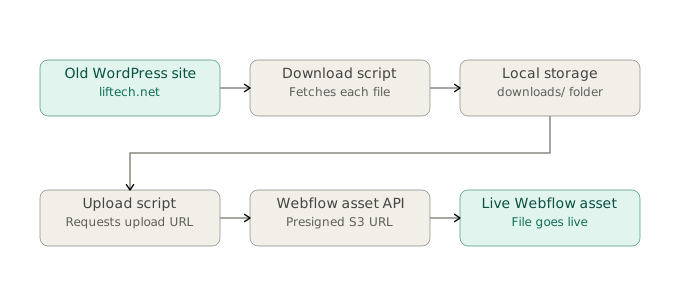
So we wrote a python script for the downloads and one for the two uploads. They don't talk to each other directly, they hand off through a CSV log, which turned out to be a very useful artifact from the project (more on that below).
The download script reads a CSV export of the old file URLs from WordPress — some rows have multiple files separated by semicolons, which we split and dedupe on the way in — then pulls each one down with a plain requests.get().
The upload script talks to Webflow's Data API, which requires a two-step handshake for any file: you POST the filename and an MD5 hash to get a presigned S3 URL back, then POST the actual file bytes to that S3 URL in a second request. Nothing about this is hard once you know the steps, but it's also not obvious from the get go.
The failures were small, and small failures are the ones that blow your whole afternoon.
None of what broke next was architecturally interesting.
The server started blocking us. A batch of downloads came back 403 Forbidden. Not an auth problem — WordPress hosts commonly block the default user-agent string that requests sends, because it doesn't look like a browser. One line fixed it:
REQUEST_HEADERS = { "User-Agent": ( "Mozilla/5.0 (Macintosh; Intel Mac OS X 10_15_7) AppleWebKit/537.36 " "(KHTML, like Gecko) Chrome/124.0.0.0 Safari/537.36" )}The Python version didn't match the syntax. The upload script used str | None type hints, which need Python 3.10+. The machine running it had 3.9. The fix is a single import, but the failure mode — a TypeError on a line that has nothing to do with our actual logic looks scarier than it is:
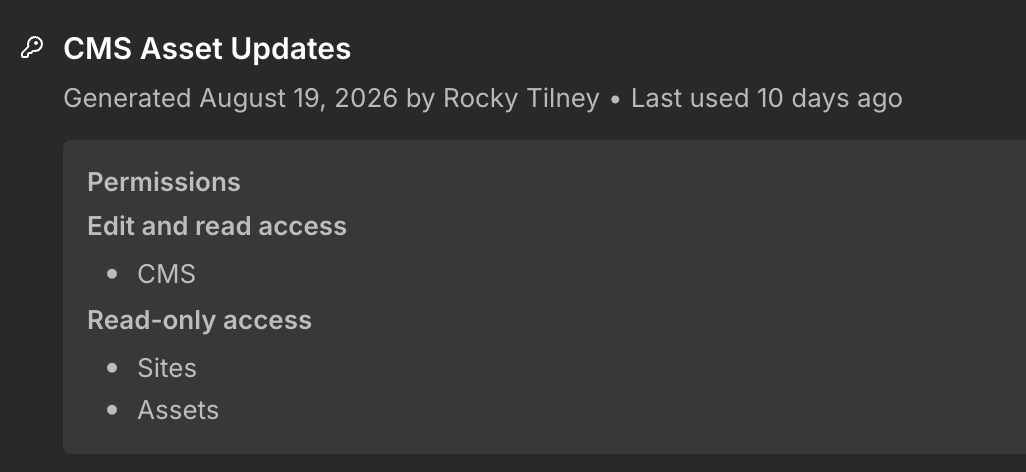
from __future__ import annotationsThe API token had the wrong scopes — three times. First pass: missing sites:read. Regenerated the token, added CMS access. Second pass: still missing pieces. Webflow scopes tokens per-permission-category (Sites, CMS, Assets, each with separate read/write toggles), and "close enough" doesn't work — we either have the exact scope the endpoint checks for, or we get a 403 that tells us almost nothing about which scope is missing.
None of these individually mattered. Together, they're the actual texture of doing this kind of migration — not one hard problem, a sequence of small specific ones, each solvable in isolation, each invisible until we hit it.
The numbers didn't add up, and that was the point
130 files went into the download script. 123 came out the other side successfully uploaded. The instinct is to call that close enough and move on. We didn't, and it's worth explaining why.
Two files failed outright — both hit a hard 100-character filename limit on Webflow's asset API, something like Seismic-Response-of-Jumbo-Container-Cranes-and-Design-Recommendations-to-Limit-Damage-and-Prevent-Presentation.pdf. Fine, that's explainable, upload those two manually with shorter names.
But 130 minus 2 is 128, not 123. The remaining gap turned out to be two pairs of files that shared an identical filename — the same publication, re-uploaded to the old WordPress site in two different years, landing at two different URLs but the same local filename on download. That's not a bug. That's a real duplicate in the source data that the automation surfaced instead of silently absorbing.
The lesson here isn't "check our math," though we should. It's that automated pipelines are good at telling us the truth about messy source data, if we let the discrepancy bother us instead of rounding it off. A manual process would have re-uploaded the duplicate and nobody would have noticed.
The CMS mapping had a landmine we didn't see coming
Getting files into Webflow's asset library was the easier half. Getting the CMS collection to actually point at the right files was where the real surprises were.
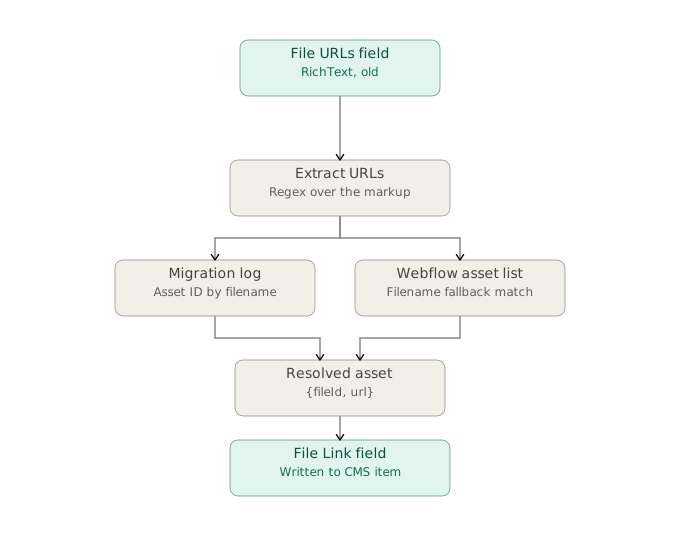
First surprise: the field holding the old URLs, which we'd assumed was plain text, turned out to be a RichText field. That means every "URL" we needed was actually buried inside HTML markup, not sitting there as a clean string. Fix was a regex extracting anything that looked like a file URL out of the markup — but it's the kind of assumption that, if we hadn't checked, would have silently failed to match a single item.
Second: Webflow's native File field type doesn't store a URL. It stores a reference object — {"fileId": "...", "url": "..."} — which meant our matching script needed the asset ID from the original upload, not just the hosted URL. Lucky break: the upload script's log already had it, tucked into a status string like ok (65f3a...), because we'd logged it for debugging and never expected to need it for anything else. That log became the primary source of truth for the CMS update; a live filename-match against Webflow's asset list became the fallback for anything the log didn't cover.
Then we found out ~30 publications had more than one file
Some of these publications had both a paper and a conference presentation attached — two files under one CMS item. Webflow's File field holds exactly one reference. Multiply that across the collection and roughly a quarter of the items didn't fit the model we'd built.
We considered the "correct" solution: a separate reference collection, one item per file, linked back via a multi-reference field. That pattern scales cleanly if this collection grows large or if other collections need the same multi-file pattern later.
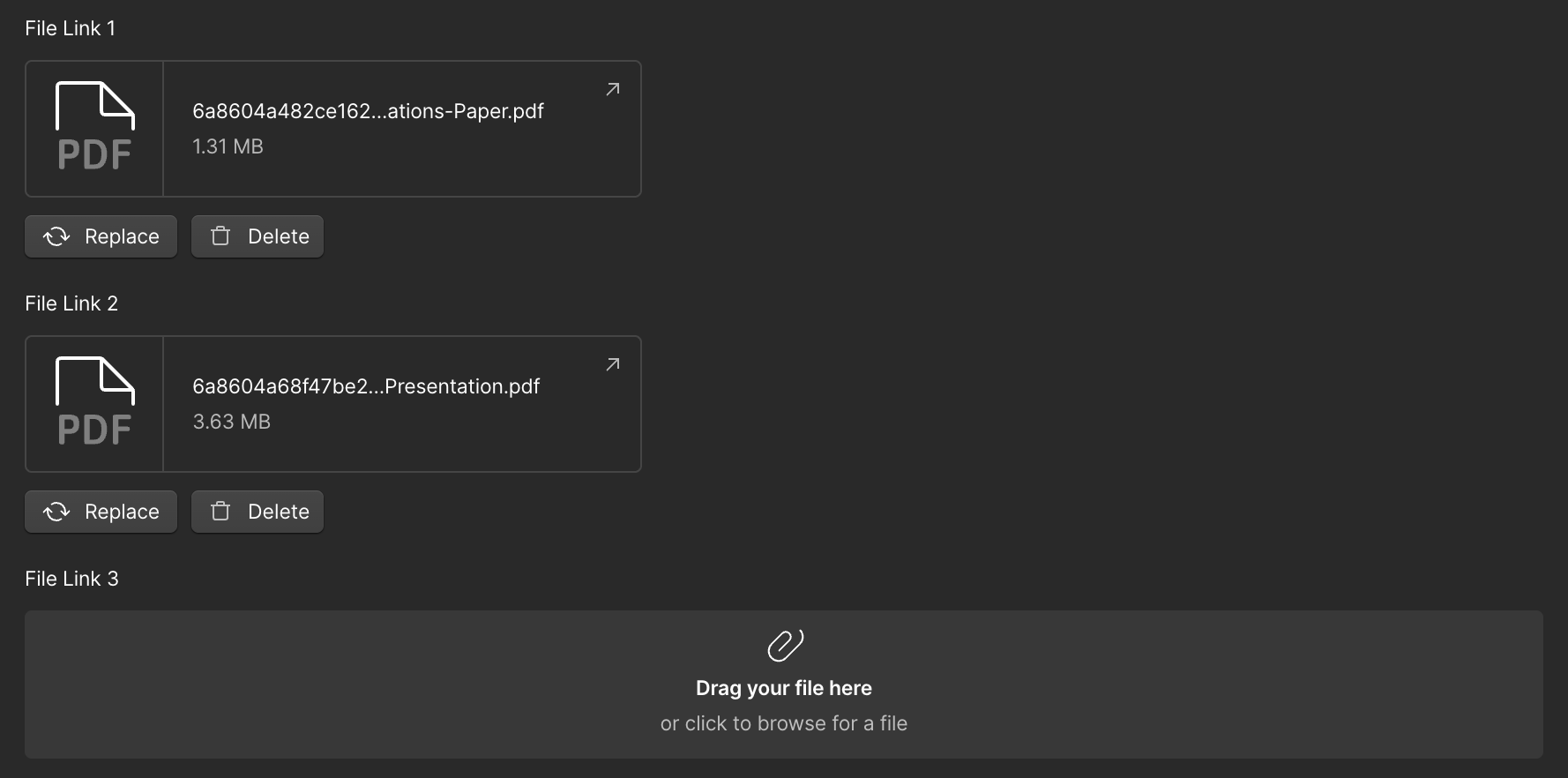
We decided not to build it that way. This is archival content and includes papers going back decades, added a handful of times a year. The overhead of a second collection and a reference-picker UI wasn't worth it for content that changes this rarely. We added three File fields instead — File Link 1, 2, 3 — and had the script distribute files across them in order, flagging anything with more than three for manual review.
It's brittle if the file count per item ever grows past three.
Where we ended up
130 source files. 123 uploaded automatically. 2 fixed manually for filename length. All duplicate-filename cases surfaced which was helpful. Every Publications CMS item points to a typed File reference instead of a plain-text link — including the roughly 30 items carrying more than one attachment.
What we'd tell someone doing this again
Build the download and the upload as separate steps with a log between them, even if we could technically chain them into one pass. The log becomes our source of truth the moment something downstream needs information we didn't think we'd need.
Don't trust a field's display name to tell us its actual type or its actual API slug. Check both, every time, before you write to it.
And pick the boring, slightly-too-simple solution when the content justifies it. Three fields instead of a reference collection wasn't the more impressive choice. It was simply easier.